Tasks
Tasks
Astra uses the concept of a “task” to define some work to do. This is usually something like:
- Open a file.
- Perform some work.
- Output the results to a new file or a database.
Each task can define some set of tasks that it needs (requires) to be complete before it can run. That way we can evaluate whether a task is ready to be executed, and how tasks depend on each other.
Tasks can have complex dependency chains, and even recurrent dependencies. We use Luigi to manage task dependencies so that workflows are automagically created and tasks are only scheduled for execution if they are needed. Most users of SDSS data do not need to know about how Astra manages tasks and their dependencies. However, if you are developing or testing an analysis component for Astra, or you’d like to analyse some SDSS data using non-custom parameters, then you will need to know about how Astra defines tasks.
Definition
A task is uniquely defined by:
- It’s parameters: This could be things like “initial temperature”, or “FERRE version”, or “continuum order”.
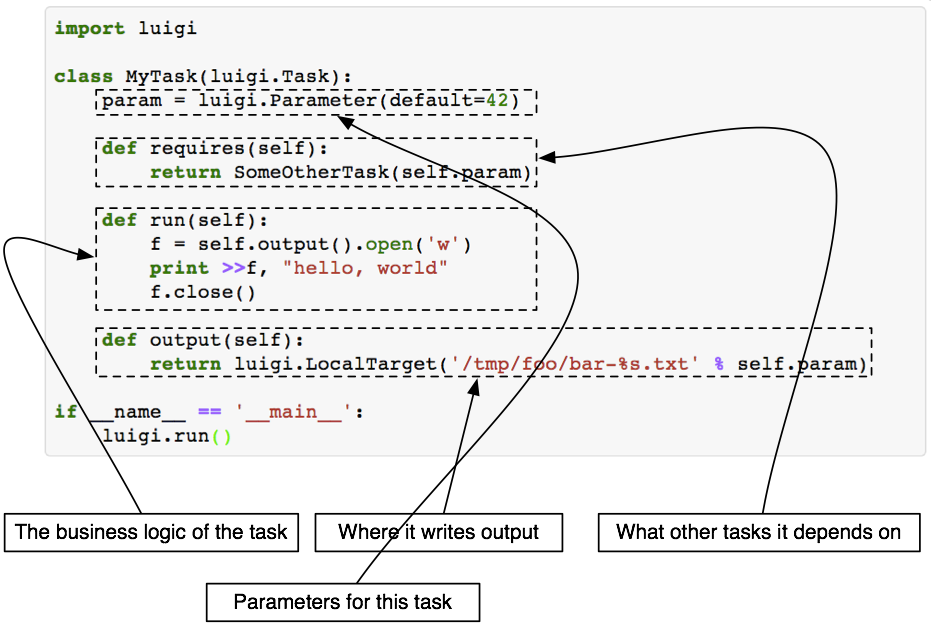
- It’s requirements: What tasks must be completed before this task can be executed? This might be something like “continuum normalization”, or “classification”, or it might just be “a reduced data file exists” (see here). The requirements are explicitly defined by the
requires()function. - What does it do: What is the analysis or result that is executed by that task? This is defined in the
run()function. - It’s output: Where is that output stored? Usually a task will output an intermediate file to disk. This might seem bad at first because you will have many intermediate files, but whether an output file exists or not is usually how Luigi (and by consequence Astra) decide whether a task has already been completed or not. This is defined in the
output()function.
It is important to know that every Task must be idempotent: re-running the same Task with the exact same input parameters should produce the exact same output, every time. That can make things a little difficult for Astra because it means changing one parameter (e.g., initial temperature) means we need to output() the results of that Task to a different location! That means we could have many, many intermediate files while testing various things, but that’s OK: that’s a tractable problem.
If you’re still uncomfortable about intermediate data products just remember: you can always have another task can collect many results together, and another can clean up intermediate data products. Here is a figure from the Luigi documentation that defines the logic for a task:
Building a workflow
By having tasks define their own requirements, and where their outputs will be written, Luigi will execute which tasks are required.
# TODO
Common Tasks
SDSS Data Model Tasks
Tasks can only require other Tasks. That means if you want to write a task to estimate the signal-to-noise ratio of a spectrum then your only requirement might be that a file actually exists for you to open it! Unfortunately, since a `Task`s can only require other `Task`s, that means we need to wrap a file in a special way.
Since this is a common task, Astra has many Task definitions built in so that you can just require one of those.
Specifically, every file that has a SDSS data model definition will have a corresponding Task that your can require.
Let’s go through a simple (yet complete!) example:
import luigi
import os
import numpy as np
import pickle
from astra.tasks import BaseTask
from astra.tasks.io import ApVisitFile
from astra.tools.spectrum import Spectrum1D

class EstimateSNRofApVisit(BaseTask):

    # Let's say our task has a fudge factor parameter that is multiplied by the S/N estimate.
    fudge_factor = luigi.FloatParameter(default=1.0)

    def requires(self):
        # We require an ApVisitFile to exist!
        # (Here it is good practice to only give ApVisitFile the parameters that it needs.)
        return ApVisitFile(**self.get_common_param_kwargs(ApVisitFile))

    def output(self):
        # Let's store the S/N in a file in the same directory as the input file.
        output_path_prefix, ext = os.path.splitext(self.input().path)
        return luigi.LocalTarget(f"{output_path_prefix}-snr.pkl")

    def run(self):
        # Let's estimate the S/N!
        spectrum = Spectrum1D.read(self.input().path)

        # The spectrum.uncertainty is the inverse variance, so sqrt(ivar) = 1/noise
        mean_snr = np.nanmean(spectrum.flux * np.sqrt(spectrum.uncertainty))

        # Apply fudge factor.
        final_snr = self.fudge_factor * mean_snr

        # Save output.
        with open(self.output().path, "wb") as fp:
            pickle.dump((final_snr, ), fp)
That’s it. You can see that our EstimateSNRofApVisit task only requires that an ApVisitFile exists. If we created a EstimateSNRofApVisit task for every observation we expect SDSS to take until 2025, and ran Astra every day, then Astra would only estimate the S/N of each apVisit file once, and only execute tasks once observations had been taken. In that sense it is lazy-ish execution.
We need some parameters to fully define a ApVisitFile task (or any other SDSS data model task). The parameters we need for ApVisitFile are defined by the SDSS data model for apVisit files, which you can also find in the sdss_access documentation.
release: the SDSS data release (e.g., “DR16”)telescope: the telescope the observation was performed with (e.g., apo25)field: the field the target is inmjd: the Modified Julian Date of the observationplate: the plate used for the observationsfibre: the fibre used in the plateapred: the version of the reduction pipeline used to process this observationprefix: a prefix string (usually always “ap”) that exists largely for legacy value
Together these parameters uniquely define an observation, from any data release, with any reduction pipeline version used. These parameters can be used to generate the path where the file is stored (either locally or on the SDSS Science Archive Server).
The following SDSS data products have Task definitions in Astra, and registered astropy.io.fits loaders so they load correctly with astra.tools.spectrum.Spectrum1D:
apVisit: individual visit observations using the APOGEE spectrograph (see documentation)apStar: combined visit observations using the APOGEE spectrograph (see documentation)spec: BOSS spectra (see documentation)
Continuum Normalization Tasks
The following continuum normalization tasks exist in Astra and can be readily used by any component:
astra.tasks.continuum.Sinusoidal: fit pre-defined continuum pixels with a sum of sine and cosine functions